
Choosing the write software
What I see around me is that many writers use a generic word processor to write their stories. Think of Microsoft Word, OpenOffice, LibreOffice, or Google Docs. When I ask for the reason, the answer is never: ‘because it’s the best tool for writing my book.’ Usually, their motivation is more practical: they already have the software, they know how it works, and you can do an enormous amount with it. In their view, it’s not a wrong choice for writing a book. But the real question is: is it also the best choice for you as a writer?
The path of the novel
Writing a story — a creative work on the scale of a novel — is different from writing a report, a letter, or a mailing. It requires dedication, discipline, and perseverance. It is a process in which the development of your book goes through several stages. Think of:
-
developing your idea,
-
developing plot and structure,
-
developing the characters, world building, etc.,
-
maybe do some research,
-
writing the first draft,
-
reflecting and making adjustments,
-
textual refinement,
-
proofreading, and
-
preparing for self-publishing or submitting to a publisher.
Each stage has its own challenges, and you will probably find some stages easier than others. It is precisely in the parts that you feel less comfortable with, that you could use some help and support. That may come from a writing coach, a writing buddy, or a writing group.
Why specialized writing software?
But your writing software can also support you, when the developer has focused on the problems faced by creative writers and tried to find good solutions for them. That is a fundamental difference compared to a generic word processor, which traditionally focuses on office users.
The level of support for each stage of the writing process may vary from one writing program to another, as well as how well it matches your personal preferences. That is why I recommend trying out several different writing programs before making a choice. Although a manuscript can often be exchanged between different applications, this is much more difficult for things like characters, storylines, notes, etc. Making a well-considered choice beforehand prevents frustration later.
Why Digital-Ink?
Digital-Ink was developed with one target group in mind: the fiction writer. The software distinguishes between:
-
Novel
-
Short story
-
Poetry bundle
Because the system knows what kind of project you are creating, it can provide targeted support. Chapters, for example, are only relevant in a novel. A poetry bundle is logically structured as separate poems.
Thanks to that context, the software can support you more effectively.
In Digital-Ink, the emphasis is on focus. At the right moment, you see the right tools, without unnecessary distraction:
-
Structure and scene view are displayed side by side
-
Story elements are accessible via an action bar and can be made visible alongside the structure and scene view
-
The plot designer fills the screen but is only shown when you are working on the storylines
-
In most cases, the text editor remains centrally visible
The goal is simple: to keep you writing.
That may sound abstract if you haven’t seen it in action. But feel free to try it out. You’re not committing to anything.
Switching? It’s easier than you think
In the latest version of Digital-Ink (v2026.02.13), when creating a new project, you can import an existing manuscript in DocX format. This lowers the threshold for trying it out because you can continue on the project you are already working on.
Why only DocX? To keep the import function reliable and clear. Virtually all modern word processors can save as DocX, so in practice this is not a limitation.
Smart importing
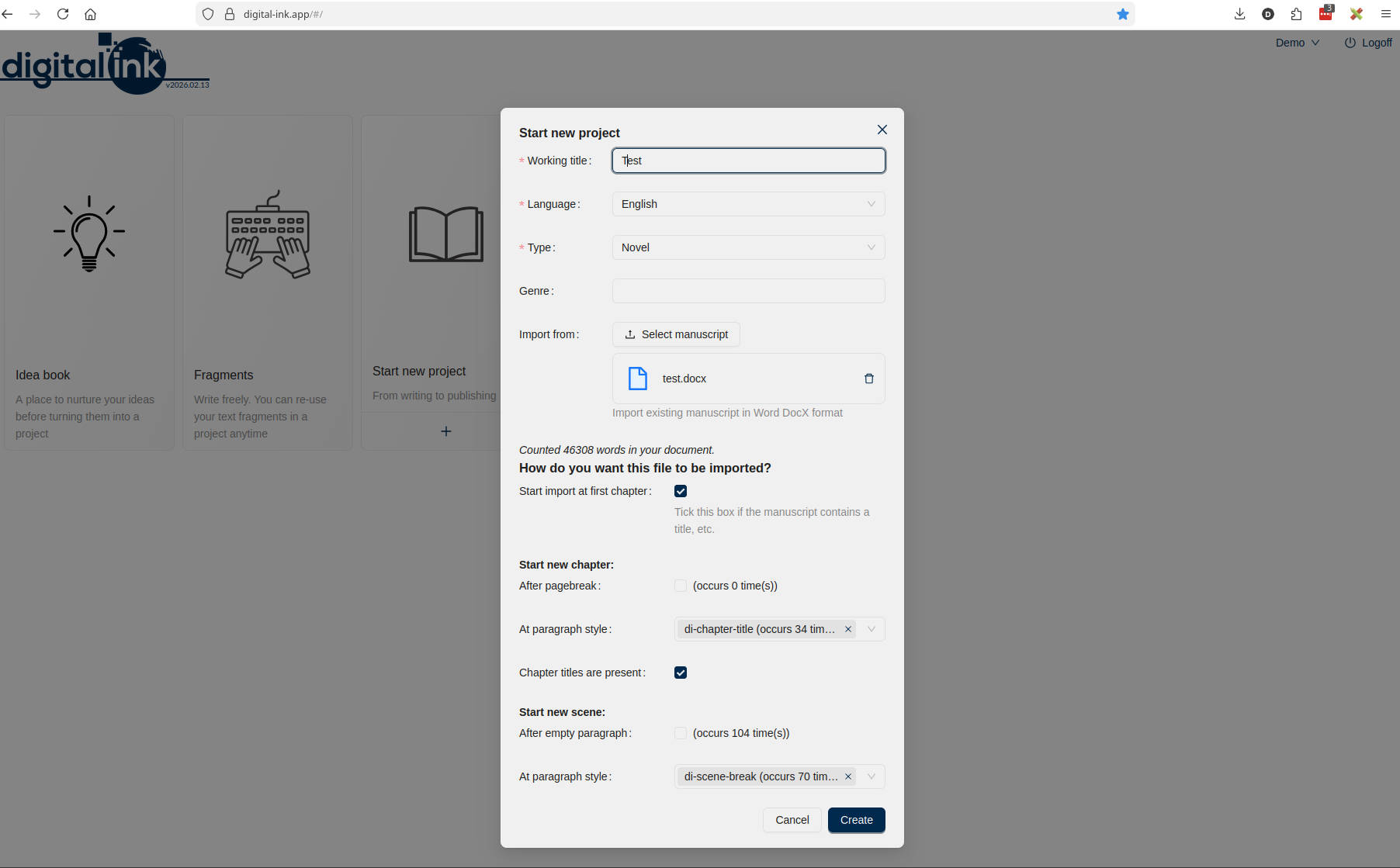
During the import process, the software helps you divide your manuscript into (where applicable):
-
Chapters
-
Scenes
-
Poems
This can be done based on:
-
Page breaks
-
Paragraph styles
-
Blank lines
You can also indicate whether the document begins with title and author information, so that the import starts at the first chapter, scene, or poem. If you do not do this, that information will simply be included in the text and you can adjust it afterward. See the screenshot below.
When needed, you can always delete your project and start over with different import settings.
Naturally, you can export your manuscript back to DocX format. In addition, you can also export story elements and storylines. This way, you remain flexible while benefiting from specialized support during the writing process.
See you at the next post, and until then: happy writing.